
Download HotDog Junior – kids, web design, create website, learn coding, children, creativity, website builder, online, templates, FTP client
Overview
HotDog Junior is a specialized productivity tool designed to introduce children to the fundamentals of web design in an accessible and engaging manner. Targeted at young users, the application simplifies the process of creating and publishing websites through a structured, four-step workflow. By guiding children through each stage of web development, HotDog Junior reduces the complexity typically associated with coding and web hosting, making it an ideal starting point for early digital creativity. The app empowers kids to emulate their parents' computing skills by giving them hands-on experience with real web technologies, including FTP uploads and template customization.
Designed with educational intent, HotDog Junior supports learning through play, enabling children to explore their imagination while developing practical digital skills. Real-world use cases include creating personal websites, school project portfolios, or digital storytelling pages. The app’s focus on parental involvement enhances the learning experience by encouraging collaboration between children and adults, fostering shared technology literacy. Although the developer did not provide additional technical details, the application’s longevity—released in 2006—suggests a stable and enduring design philosophy. In the broader app ecosystem, HotDog Junior occupies a niche role as a tool that bridges early education and digital creation, promoting both creativity and foundational technical understanding.
Key Features & Functionality
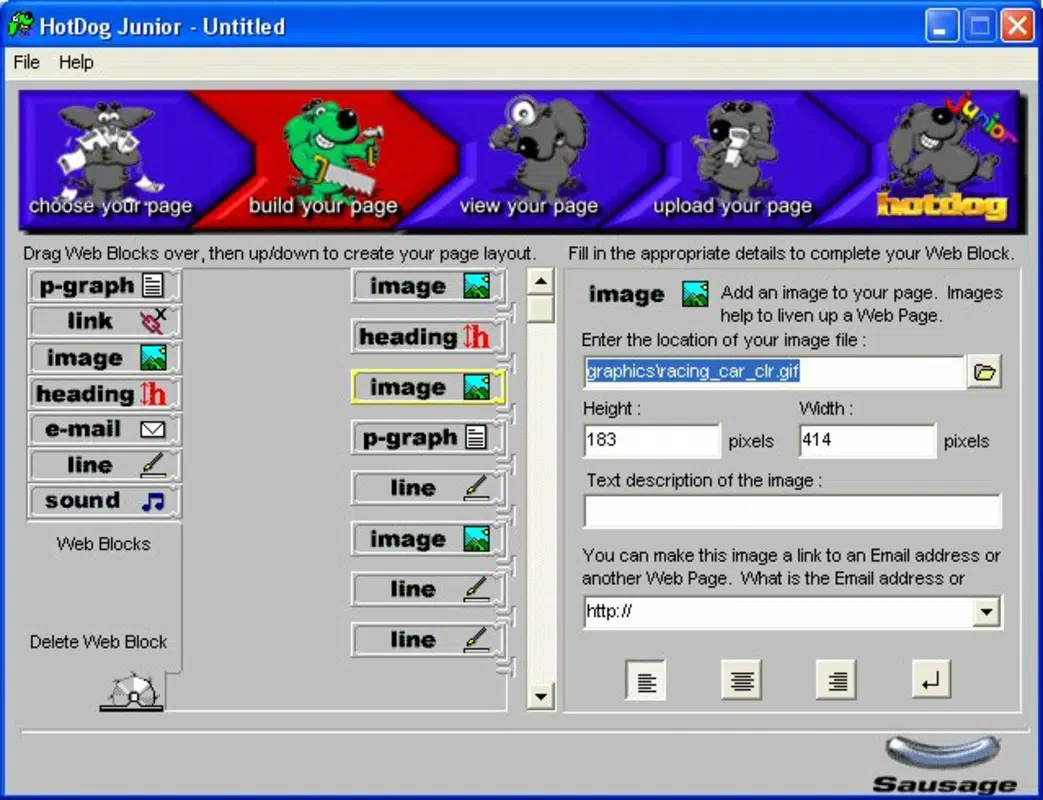
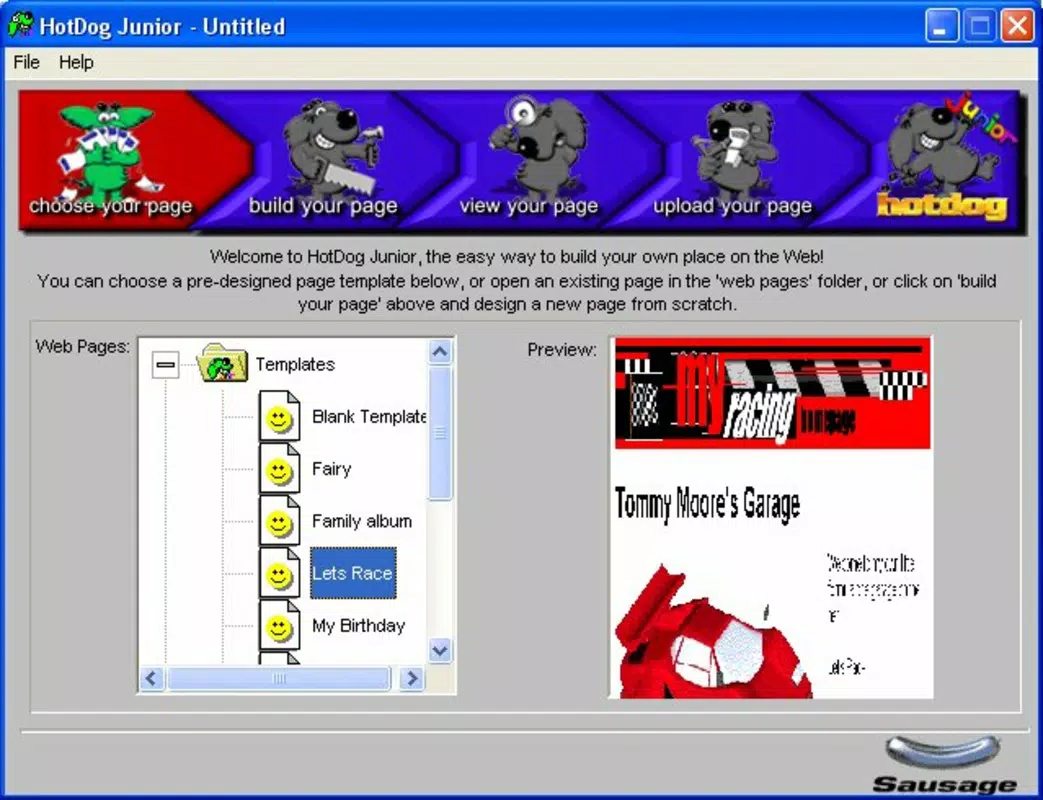
- Simple Four-Step Process: The app breaks down web creation into four intuitive stages, guiding children through planning, design, content addition, and publishing. This structured approach minimizes cognitive load and keeps young users engaged without overwhelming them.
- Customizable Templates: A selection of pre-designed templates comes with built-in images and layout structures. Children can choose a theme that matches their interests and modify colors, text, and media to reflect their personality.
- Built-in FTP Client: The application includes a user-friendly FTP client that allows direct uploading of websites to remote servers. This feature introduces children to the concept of web hosting and enables them to publish their work with minimal assistance.
- Parental Involvement Encouraged: The app is designed to be used collaboratively. Parents can assist with technical setup, such as configuring FTP credentials, while children focus on creative decisions, reinforcing learning through shared experience.
For example, a child could use the app to build a website about their favorite animal, selecting a jungle-themed template, adding photos and facts, and uploading the site to a family server. This real-world application demonstrates how the app combines creativity with practical digital skills. The combination of guided structure and personalization ensures that each project feels unique and meaningful, reinforcing motivation and confidence in digital expression.
Interface, UX & Performance
HotDog Junior features a clean, child-friendly interface with large buttons, clear labels, and visual cues to support intuitive navigation. The layout is organized around the four-step process, ensuring that users progress logically from one stage to the next. Visual style is simple and consistent, minimizing distractions and focusing attention on core tasks. While the developer did not list formal performance metrics, the app’s small file size of 1.2 MB suggests efficient resource usage, which may contribute to smooth operation on older or low-spec systems.
Navigation is straightforward, relying on sequential steps and minimal menu complexity. This design choice supports younger users with limited technical experience. Responsiveness appears to be adequate for its intended use, though specific testing data was not provided.
Stability is implied by the app’s long-standing presence since its 2006 release, indicating that the core functionality has remained reliable over time. Although the developer did not specify minimum OS requirements, the application is compatible with Windows, suggesting it operates within the constraints of desktop environments. Overall, the user experience is optimized for accessibility and ease of use, aligning with its educational mission.
Platform Compatibility & Technical Requirements
HotDog Junior is designed for the Windows platform, making it accessible to users on desktop operating systems. The software version is 1.0, indicating a stable and finalized release. The file size is 1.2 MB, which is compact and suitable for quick downloads. The app is available at no cost, with a price of $0.00, making it accessible to families and educators seeking free tools for digital education.
Specific requirements were not listed, so compatibility with modern Windows versions cannot be confirmed. The developer did not specify minimum OS requirements, nor did they detail hardware specifications. Users should exercise caution when installing on newer systems, as older applications may face compatibility issues. Despite this, the lightweight nature of the app increases its chances of running on a wide range of Windows devices, including those with limited processing power. For users seeking a secure and reliable way to begin web design education, HotDog Junior offers a low-barrier entry point.
Pros and Cons
Pros
- Designed specifically for children, with a focus on simplicity and engagement.
- Includes a guided four-step process that reduces complexity in web creation.
- Offers customizable templates with built-in images for creative expression.
- Built-in FTP client enables direct website publishing, teaching real-world web hosting.
- Encourages parental involvement, enhancing the learning experience.
- Free to download and use, making it accessible for families and schools.
Cons
- Platform limited to Windows, excluding mobile and macOS users.
- Version 1.0 is outdated, with no updates since 2006.
- Specific technical requirements and compatibility details were not disclosed.
- May face challenges running on modern Windows systems due to age.
- Limited to desktop use, with no mobile or tablet support.
FAQ
Is HotDog Junior safe to download and install?
Yes, the app is free and available from trusted sources. It has been widely used since its release in 2006 and does not contain known malware or harmful components.
Can I use HotDog Junior on my smartphone?
No, the application is designed exclusively for Windows desktop systems. There is no mobile version available for Android or iOS devices.
Does HotDog Junior require an internet connection?
Yes, an internet connection is required to access online templates and to upload websites via the built-in FTP client.
Is there a way to update HotDog Junior?
As of now, the app is version 1.0, and no updates have been released since its 2006 launch. Users should check official sources for any potential updates.
Can parents use HotDog Junior without technical experience?
Yes, the app is designed to be used with parental guidance. Simple instructions and a user-friendly interface make it accessible even for adults with minimal tech knowledge.
Final Thoughts
HotDog Junior remains a unique and valuable tool for introducing children to web design in a fun, structured, and educational way. Its emphasis on creativity, simplicity, and real-world application sets it apart in the productivity category. While the app is outdated and limited to Windows, its core concept—empowering young minds with digital skills—remains relevant. Families and educators seeking a free, no-frills way to teach web development basics will find significant value in this tool. Despite its age, HotDog Junior continues to serve as a reliable gateway to digital creation.
Download HotDog Junior now


